
Voici un nouveau tutoriel afin d’installer le module camera V2 de 8 méga pixel sur le robot MRPi1 : installer la camera V2 Pi
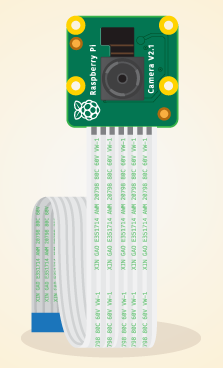
Voici un nouveau tutoriel afin d’installer le module camera V2 de 8 méga pixel sur le robot MRPi1 : installer la camera V2 Pi
Je vous informe que l’entreprise Mace Robotics sera présent le samedi 30 avril à la première rencontre Nationales Raspberry Pi à Nevers.

Information : http://adn.agglo-nevers.net/index.php/rendez-vous/1-premieres-rencontre-nationales-raspberry-pi
The python program :
from mrpi1_lib import *
import time

#main program

state = 1

try:
  # infinite loop
  while 1:

    if state == 2:
      play("Thank you bye")# speech synthetis
      state = 3
    # read sensors
    p3 = proxSensor(3)
    p4 = proxSensor(4)

    forward(30)
    print "%d %d" %(p3, p4)

    if (p3 > 900 or p4 > 900):
     stop() # stop robot
     state = 2
     playWav("BeCarefull.wav") # play wav file


except:
  stop()
  exit()
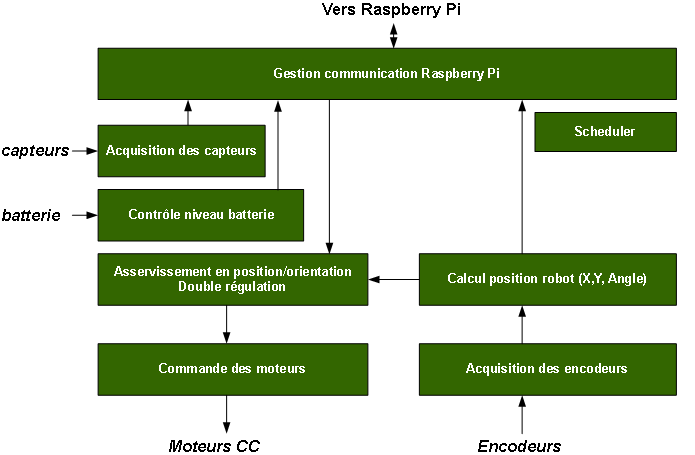
Voici, l’architecture logicielle du microcontrôleur STM32F407 du robot MRPi1 :
The python program :
from mrpi1_lib import *
import time

# activer le controle
controlEnable()

# avancer de 30 cm
forwardC(15, 1200)

# boucle infini
while 1:
  # lecture capteur de proximité 3
  p = proxSensor(3)

  # pause de 0.5 seconde
  time.sleep(0.5)

  # si capteur > 300
  if p > 300:
    backC(15,1200) #reculer de 30 cm
exit()
On this video the MRPi1 robot follows a black line autonomously. The 3 ground sensors are used.
Wake up alarm with MRPi1 robot. The robot stops the alarm automaticly when the robot detects the light.
Python program :
# import mrpi1 lib
from mrpi1_lib import *
import time

try:

  while 1:
    al1 = ambiantLight(1) # read ambiant light,sensor 1
    al2 = ambiantLight(2)
    al3 = ambiantLight(3)
    al4 = ambiantLight(4)
    al5 = ambiantLight(5)
    al6 = ambiantLight(6)
    print "Ambiant light = %d %d %d %d %d %d" %(al1, al2, al3, al4, al5, al6)

    if (al1 < 4000 and al2 < 4000): # light detects
     print "end alarm"
     writeCommand("SPD")# disable speaker
     exit()
    else:
      playWav("alarmClock.wav") # play alarm wav file
    time.sleep(0.2)

except:
  writeCommand("SPD") # disable speaker
  exit()
Raspberry Pi robot – MRPi1 football from macerobotics on Vimeo.
In this video MRPi1 robot is controled by two PID controller. The PID controller calculates an error values between motors encoders and desired value (orientation and distance).
The speed profile :
Encoders specification :
Raspberry Pi robot – MRPi1 from macerobotics on Vimeo.
New video, control the MRPi1 prototype with a simple web interface.